Making Video Content Searchable with Docling and OpenRAG
📺 Prefer to watch instead of read? Click here to view the video walkthrough
If you're a content creator or anyone who watches videos, you've probably had the experience of trying to find some information or knowing for sure you had a video on some topic, but simply can't find it or remember exactly what the detail was.
As a content creator myself, I've recorded many dozens of videos, and some of them have some really useful information tucked away in their bits and pixels. Unfortunately, at least for me, it's easy to lose said knowledge.
Now imagine searching through 12 hours of podcast content and finding the exact timestamp where a specific topic was discussed - in seconds, not scrubbing through timelines, not relying on vague memories. Just asking a question and getting the precise moment with full context.
That's exactly what I built with https://github.com/SonicDMG/video_to_openrag using Docling and OpenRAG.
(As of this writing, OpenRAG is new open source development in open preview on version 0.4.1. We'd love your feedback or help contributing to OpenRAG to make it even better.)
The Problem We All Know Too Well
Ok, so you're debugging something. You know you watched a conference talk last month that explained exactly this problem. You remember the speaker had a great analogy about context engineering and you could really use it right now. Was it that 45-minute keynote or the lightning talk?
You spend 20 minutes scrubbing through video timelines, trying to find that one golden nugget of wisdom. Sound familiar?
The issue is that video content is amazing for learning, but terrible for reference. We've got thousands of hours of conference talks, tutorials, and technical deep-dives locked away in linear video format, completely unsearchable beyond basic title/description metadata.
What if you could ask questions like "What did the speaker say about agent note taking?" and get the exact timestamp with context?
What is THIS MAGIC?
Video to OpenRAG is a Python pipeline that transforms YouTube videos into semantically searchable knowledge bases. It's like giving your brain direct access to a searchable video library.
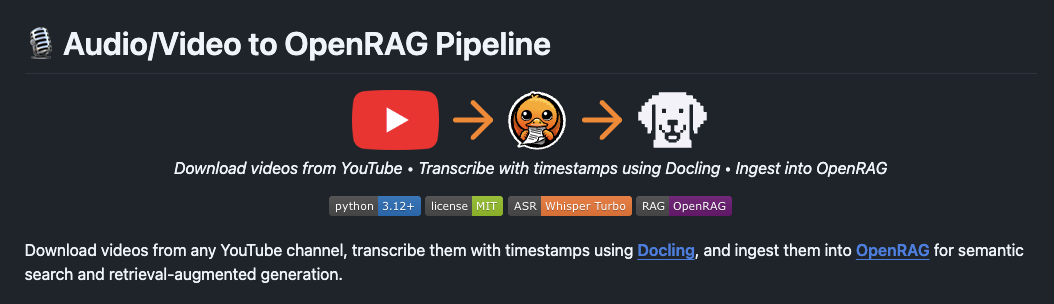
Here's what happens under the hood:
- Download videos from YouTube (single videos, playlists, or entire channels)
- Transcribe them locally using Whisper Turbo (via Docling's convenient API wrapper) with timestamp preservation
- Ingest transcripts into OpenRAG for semantic search and RAG applications using local LLMs via Ollama
The best part is that everything runs locally. No API keys for transcription, no sending your data to third-party services, no usage limits. Your video recordings stay on your machine.
(I particularly love Ollama's cloud based models, cheap access, solid performance, and the same privacy we've come to expect from them. It does mean I'm using their cloud, but I could run models completely locally if needed.)
Let's See it in Action
I ingested 12 hours of episode content into OpenRAG from my podcast The Flow.
Here's a conversation with the OpenRAG agent searching through that content.
The first question I asked:
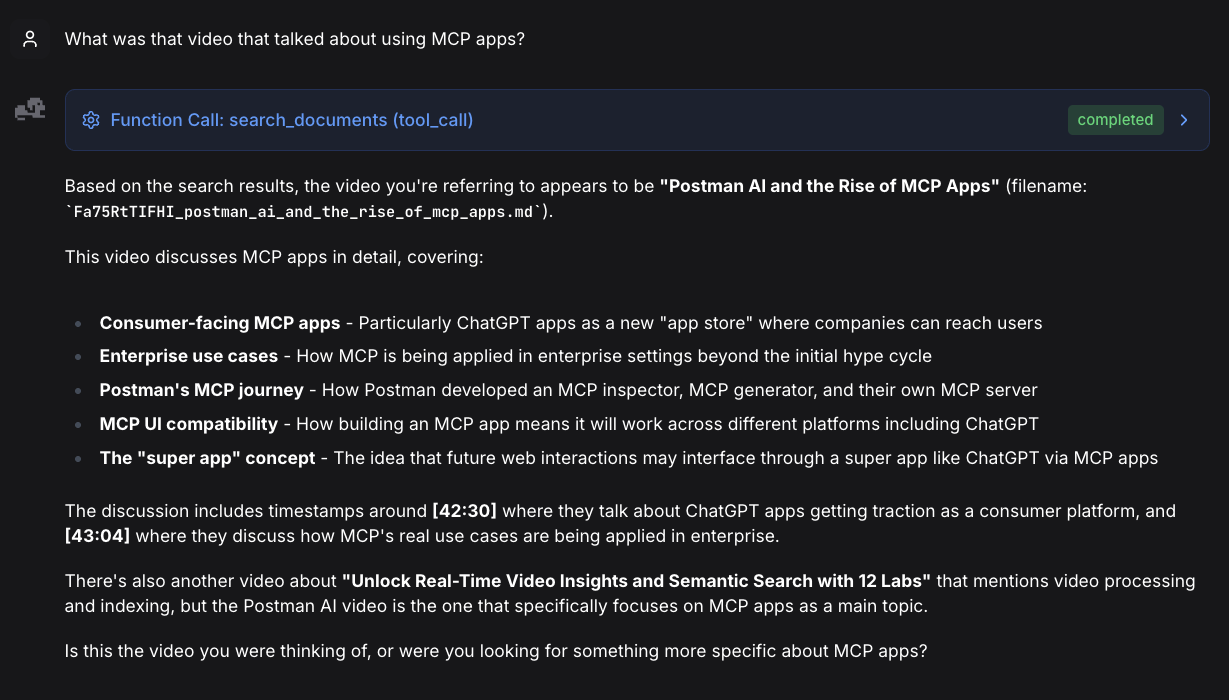
Then a follow up:
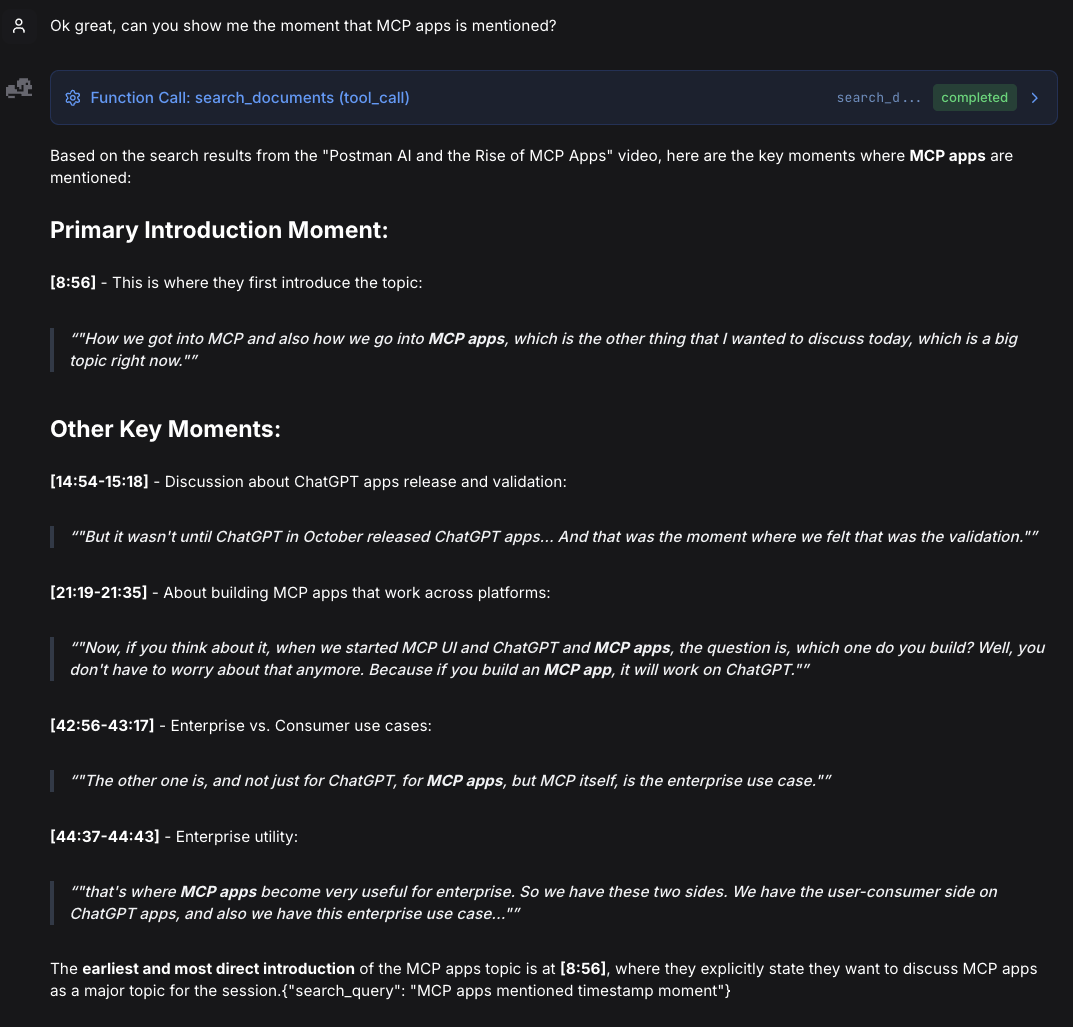
Now the fun part:
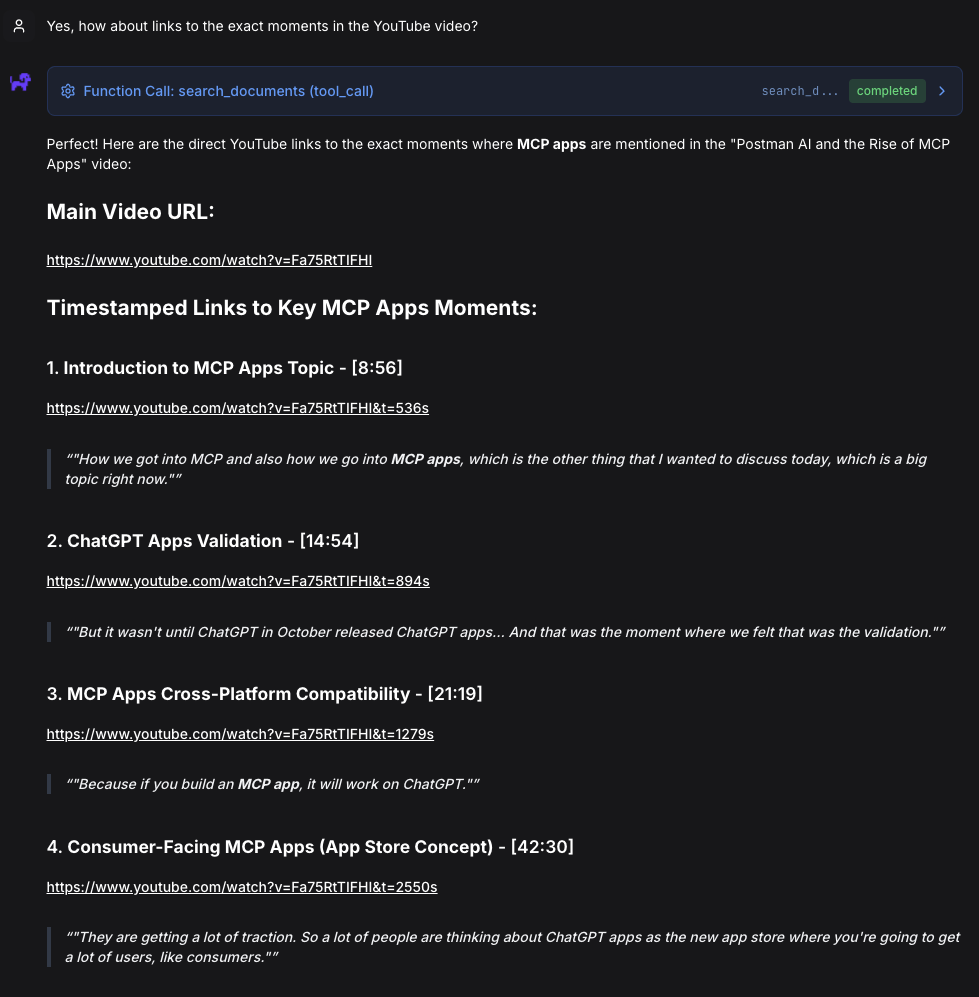
(It took seconds to search through 12 hours of content and find exact moments - something that would have taken me hours of manual searching and scrubbing through timelines.)
Feel free to try these yourself
I was honestly super impressed by the accuracy of the recall and OpenRAG's ability to give me the links to the exact timestamps in the video.
-
Introduction to MCP Apps Topic - [8:56]
https://www.youtube.com/watch?v=Fa75RtTIFHI&t=536s -
ChatGPT Apps Validation - [14:54]
https://www.youtube.com/watch?v=Fa75RtTIFHI&t=894s -
MCP Apps Cross-Platform Compatibility - [21:19]
https://www.youtube.com/watch?v=Fa75RtTIFHI&t=1279s -
Consumer-Facing MCP Apps (App Store Concept) - [42:30]
https://www.youtube.com/watch?v=Fa75RtTIFHI&t=2550s -
Enterprise Use Cases for MCP Apps - [42:56]
https://www.youtube.com/watch?v=Fa75RtTIFHI&t=2576s -
Two Sides: Consumer vs Enterprise - [44:37]
https://www.youtube.com/watch?v=Fa75RtTIFHI&t=2677s
Inspiration
I was inspired recently to write this app after watching Tejas Kumar's video "Unlocking Video Knowledge with Docling: Transcribe & Query with AI" that demonstrated how to expose Docling's audio ingestion capabilities in less than 30 lines of code. The moment I watched it, I was like "OMG, I can use this for my video content!". So here we are.
(Tejas's original video uses mp3 which can also work for videos, but while coding I learned that Docling also handles video formats like mp4 so I switched gears to interface with videos directly instead of converting them to audio.)
Using his template, I derived this app that extends those capabilities for video and leverages Docling's built in capabilities to transcribe both text and timestamps.
Tech Stack
Core technologies:
- Whisper Turbo: OpenAI's state-of-the-art speech recognition model (Docling optimizes with MLX on Apple Silicon)
- Docling: IBM Research's document processing framework (provides convenient wrapper around Whisper)
- OpenRAG + SDK - Semantic search and RAG platform
- Ollama: Local LLM runtime for embeddings and chat (keeps everything on your machine)
- yt-dlp: The Swiss Army knife of video downloading
- Rich: Beautiful terminal output (because UX matters in CLI tools too)
- Python 3.12+: Modern Python with all the goodies
How They Work Together
The pipeline orchestrates these tools in a seamless flow:
Whisper (via Docling's API) transcribes YouTube videos → Docling structures the output with timestamps → OpenRAG ingests for semantic search → Ollama provides local LLM embeddings and chat
A Little More Detail
Docling
- AsrPipeline — Docling's media processing pipeline that handles speech-to-text conversion from video or audio files
- asr_model_specs.WHISPER_TURBO — Pre-configured Whisper Turbo model specification for fast, accurate transcription
- DocumentConverter — Docling's unified converter that can process multiple document types (PDF, video, audio, images, etc.)
- AudioFormatOption — Configuration class that tells DocumentConverter to use the ASR pipeline for media files
- Video file support — Downloads full video files (.mp4, .webm, etc.) and Docling extracts audio internally using ffmpeg (no separate audio extraction step needed)
Why This Matters
- Docling handles all the complexity of video/audio processing (ffmpeg integration, model loading, chunking)
- Returns a structured DoclingDocument with rich metadata
- No separate audio extraction needed — processes video files directly
- DoclingDocument is preserved throughout the pipeline for structure-aware export
- No need to manage Whisper models directly
OpenRAG + SDK
- documents.ingest() — Uploads Markdown transcripts with automatic chunking and embedding
- knowledge_filters — Query-time filtering system to scope searches to specific document sets without re-indexing
Why This Matters
- OpenRAG handles all document processing complexity (chunking, embedding, vector storage) automatically
- Knowledge filters enable query-time scoping without re-indexing the entire knowledge base
- Self-hosted architecture provides full data control and privacy
- No need to manage embedding models, vector databases, or chunking strategies manually
- Automatic retry logic with exponential backoff handles transient network failures gracefully
Closing Up
Video content is incredible for learning but frustrating for reference. This pipeline bridges that gap, turning your video library into a searchable, queryable knowledge base - all running locally on your machine.
The real power comes from the interaction between Docling and OpenRAG. Docling's structured document processing preserves the temporal context of video content, while OpenRAG's semantic search makes that structure instantly queryable. Together, they transform hours of linear video into searchable knowledge you can navigate conversationally.
Make your video library searchable!
The code is MIT-licensed; you're free to use it however you see fit. Build something cool? I'd love to hear about it.
(As of this writing, OpenRAG is new open source development in open preview on version 0.4.1. We'd love your feedback or help contributing to OpenRAG to make it even better.)